Search by Meaning: What a Vector Is, Where Text Search Stops, and How It Learns to Look
What a vector is, how text search by meaning works on an ordinary processor, where it stops, and how a model learns to look and to listen.
Monday. A pipe bursts, a bedroom floods, and by evening the job has left its trail on the shared drive: a report, a voice memo, photographs, a scanned delivery note.
Three weeks later somebody asks one thing: show me everything about the bedroom ceiling. A search for words finds the report, because the report has the words. The photograph of the ceiling has no words in it at all.

This post is about the thing that closes that gap: vectors. What they are, how search by meaning works on an ordinary processor, where it stops, and how a model learns to look at a picture and to listen to a recording.
The company, Hollowmere Restoration, its people, its jobs and the files on its drive are invented. The models and every result quoted here are real: the workspace’s own answers on 22 October 2026, on one machine. The pictures are from a short film we made alongside this post; the photographs in them are generated and show no real person, place or product.
What a vector is
A vector is a list of numbers that stands for what something means. A model reads a sentence and writes those numbers down.
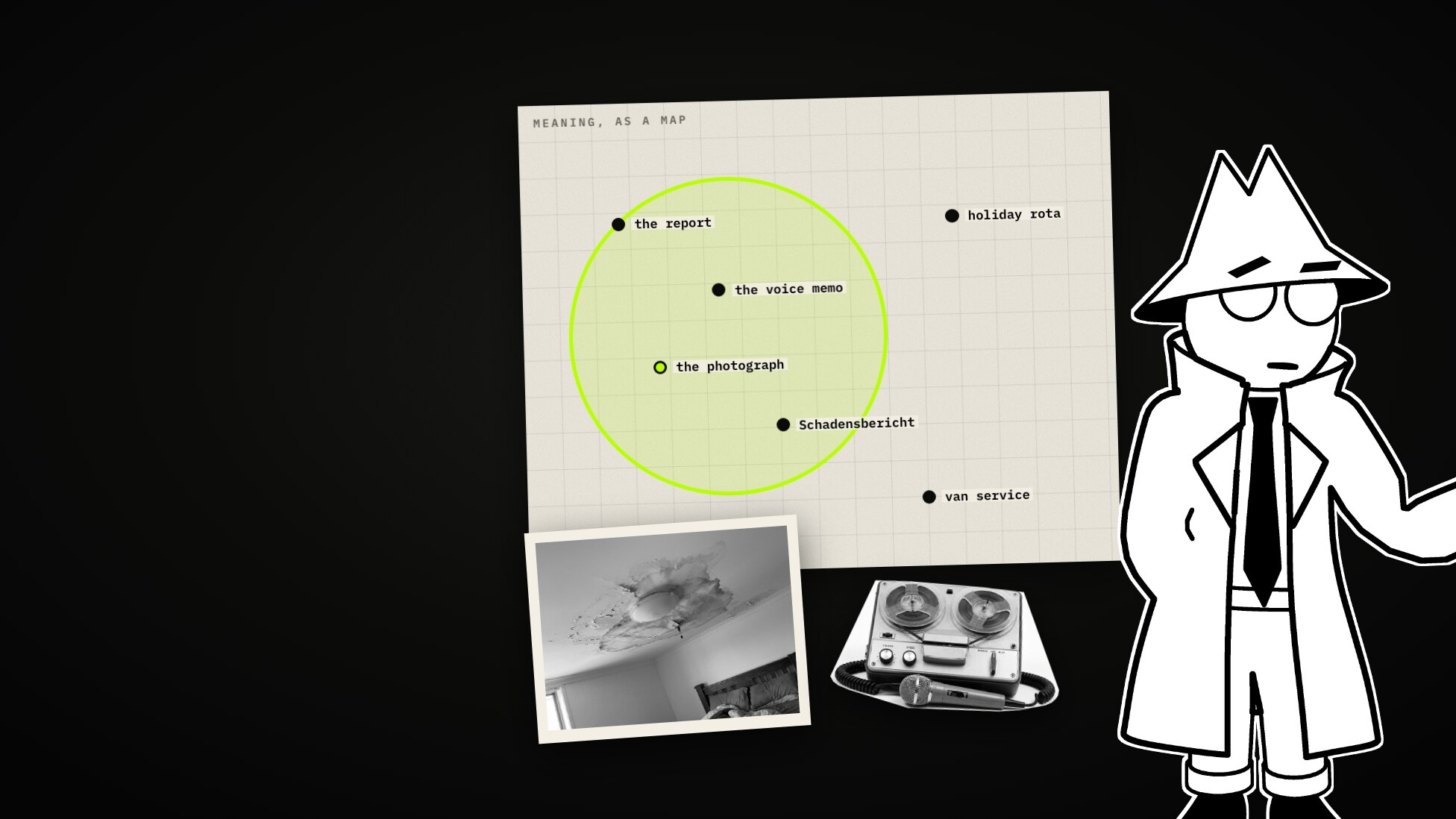
Take just two numbers, and every sentence is a point on a map. Sentences that mean the same land close together, even when they share no words: “a burst pipe” and the German Rohrbruch get nearly the same two numbers, “holiday rota” very different ones.

To search, you put the question on the same map and look at what lies nearest. Near is measured as the angle between two arrows from the middle: the smaller the angle, the closer the meaning. That is cosine similarity, and it is what Classifyre compares.

Real models use hundreds or thousands of numbers rather than two, but the idea is the same.
Text search on the processor
The simplest setup runs on any computer, and it is what Classifyre does out of the box:
- Every file is read as text: Word files, sheets and mail as they are, pictures through a reader that looks for letters (OCR), recordings through a transcriber.
- The text is cut into passages of up to 1,200 characters, each overlapping the last by 200.
- A small built-in model turns each passage into 384 numbers, on the processor of the machine Classifyre runs on. Nothing leaves it.
It is quick. On this drive the model wrote down 716 pieces of text in 12 seconds, and a question took 3 to 4 thousandths of a second.

Ask “water coming through the bedroom ceiling” and the voice memo recorded on site and the inspection report come first: both have the words. For text, this is a good place to start.
Where it stops
The photograph
A picture only becomes text through a reader that looks for letters, and a stain on a ceiling has none. Nothing goes on the map, so no question ever brings it up. On this drive three of the five photographs have no writing in them: the ceiling, the mould in the corner behind the wardrobe, the pipe under the sink.

The language
The small model learned English. Asked in German, “Schimmel im Schlafzimmer hinter dem Schrank” (mould in the bedroom behind the wardrobe), it put the German memo first. In second place was a sentence from the drive’s sample texts about two people asleep on a sofa: Ein Mann und eine Frau schlafen auf dem Sofa. It shares letters with Schlafzimmer, not its meaning. The English inspection report, which describes exactly that mould, was not in the first twelve.

How a model learns to look
A model that reads pictures closes the first gap. It cuts a picture into small squares, reads them the way a text model reads words, and writes the same kind of list of numbers, on the same map as the text. A photograph of a stained ceiling lands next to the sentence “water came through the ceiling”.

It learns that from pictures paired with their captions: each picture is pulled towards its own caption and pushed away from all the others.

A larger model like this also closes the second gap. It learned many languages, so a German question lands next to an English answer. Asked the German mould question by meaning alone, the first two texts it returned were English files about the same wardrobe: the readings (“wall behind wardrobe 27.4”) and the walkthrough video (“this is the corner behind the wardrobe, where the mould is”). The sofa sentence was not in the first forty.
Sound, when the words are not the point
Sound works the same way. A recording is turned into a picture of its sound, cut into slices a fraction of a second long, and each slice is read like a word. In Classifyre a recording is embedded in clips of ten seconds, so that a sound under somebody’s voice gets a clip, and a vector, nearly to itself.
That matters when the words are not the point. At two in the morning a neighbour leaves a message on the office phone: Hello. It’s flat one at 14 Alder Row. Sorry it’s so late. It’s started again. Just listen. Then fifteen seconds of water running in her hallway, and Somebody come round in the morning, please.
A transcript has her words and nothing else. Asked “water running”, text search did not return her message in the first twelve. The water is only in the sound.

There was a second voicemail, from the building’s caretaker: Can you hear that? over a smoke alarm. That one did not stand out. To the model, an alarm going off in a stairwell sounds close to a baby crying and a rooster, and both were in the drive’s sample sounds, so his message came well down the list. Distinct sounds are found; sounds that resemble others in the same corpus are ranked among them.
In Classifyre
This is a setting, not a project. Under Harness AI → Embedding:
- Model. Out of the box it is Local inference: the built-in model on the processor. For pictures and sound, choose Remote provider and pick a saved AI provider whose model takes them. The card under it says what the model also takes (pictures, sound).
- What is embedded. Text is always embedded. Turn Pictures on, and Sound if you want recordings embedded as sound as well.
- Scan. The next scan of a source reads each picture and recording once more, and they land on the map next to the text.
Changing the model embeds everything again from scratch, and moving back to a model that reads only text deletes what was stored for pictures and sound. The full reference is in the docs: Settings → Embeddings.

After the scan this drive held 802 vectors, 77 of them pictures and sound clips. The same questions, before and after:
| Question | Built-in text model, first results | Model that reads pictures and sound, first results |
|---|---|---|
| water coming through the bedroom ceiling | the voice memo, the report | the ceiling photograph, the voice memo, the report |
| black mould in the corner of a room | the inspection report | the corner photograph |
| a leaking pipe under a kitchen sink | a note about a boiler leak | the pipe photograph |
| Schimmel im Schlafzimmer hinter dem Schrank | the German memo, then the sofa | the corner photograph, the German memo, the report |
| Wasserschaden an der Decke im Schlafzimmer | the German memo | the ceiling photograph, the German report |
| water running | two sentences with the words; her voicemail not in the first twelve | the same two sentences, then her voicemail (first by meaning alone) |
None of the three photographs has a word in it, and her voicemail has none of the words it was found by.


The screens are screenshots of the running workspace. The lime boxes and tags on them are ours, and so are the black panels over the two rows that name the provider’s model: what matters here is what such a model does, not which one it is.
What a vector will not do
- It says that two things are alike, not why. A photograph near your question is a lead, not an answer.
- It is vague about exact things, such as a job number or a name. Asked “HR-2242” by meaning only, the drive returned three unrelated pictures and a voicemail before the note for job HR-2242. A name behaved the same way. That is why Classifyre’s search box ranks by meaning, by the words in the passages and by file names together, and merges the three lists.
| ”HR-2242” | First result | Where the job’s note came |
|---|---|---|
| Meaning only | an unrelated picture | 5th |
| The search box (meaning and words) | the job’s note | 1st |

- A remote model sees what it embeds. With a provider’s model, the text and, once they are on, the pictures and recordings are sent to that provider. The built-in model keeps everything on the machine.
A rule of thumb
Start with text, on your own processor. Add a model that reads pictures and sound when your answers live in them. And check the first results with your own eyes, on questions whose answers you know.
How to set it up: docs.classifyre.com/settings/embeddings.
More from the blog
Same or Not? How Duplicate Matching Weighs the Evidence
A plain-language explainer on duplicate matching. How two documents are compared value by value, what a weight is and how the score is worked out, what the two cutoffs decide, how to tune the noise away one change at a time, and what to do with a match that turns out to matter, shown on an invented firm's shared drive.
One Look: Decision Models, System One, and What Five of Them Did With Fifty Messages
A decision model does not write. You give it a text and a list of questions, and it answers each with a probability. What that is, where the name System One comes from, why there are suddenly so many, and what five real models did with fifty messages to a bike shop that does not exist.